For Home ServicesHandy Hive Home Services runs on PrimeOS in this demo
Onesystemforanyhome-servicetrade.
Handyman, pool care, junk removal, window cleaning, appliance repair — if you quote a job, schedule a crew and invoice a customer, PrimeOS runs it end to end.
New lead · Chris“Can you mount a 75 inch TV and hide the wires?”
Reply drafted · $189Waiting for your approval
$189 paidTV mounting
Built inside a working service businessEvery screen earned its place on real jobs
677 automated checksRun before every release
Payments by StripeCard data never touches our servers
AI never sends on its ownYour team approves every message
Your data is yoursExport it whenever you want
Sound familiar?
The home services headaches, handled.
The problemYour tools don't fit your trade
Generic invoicing apps miss scheduling; calendars miss payments.
One platform covers quoting, scheduling, jobs and payments together.
The problemRecurring and one-off both matter
Some work repeats, some doesn't — most tools force one model.
Run recurring plans and one-time jobs side by side on one board.
The problemCustomers want a pro experience
A no-name invoice text doesn't build trust or repeat business.
A branded quote, hub and receipt make a small shop look established.
How Handy Hive Home Services runs
A home services day, start to paid.
The real product, animated with a home services business's jobs, prices and crew.
01Win the job02Fill the calendar03Run the field04Get paid05Know your numbers06Delight the client
01 · Win the job
The lead texts at 8:42. The quote is signed by 9:14.
Website leads and texts land in one inbox. The AI assistant reads the request, prices it from your own price book and drafts the reply. Your office taps approve. The client signs online and the deposit saves their card.
AI drafts replies and quotes, and you approve every send
E-signature, deposits and card on file at approval
“Viewed” means the client opened it, not a link scanner
Answer first. Win more of the jobs you're already paying to get.
02 · Fill the calendar
A calendar that knows who's actually free.
Clients ask for a time and PrimeOS offers 2–3 real openings that fit your hours and your crews. The reply becomes a booking in one click. Drag a visit onto a busy crew and you're warned before it becomes a double-booking.
Per-visit crews, recurring plans and per-visit price changes
Conflicts caught before they happen
Route map and drive time for every crew's day
No more phone tag, no more double-booked Tuesdays.
03 · Run the field
Proof the work got done, without a single phone call.
Each crew member's day is on their phone. Starts are checked against the job address, the checklist keeps the work consistent, and a visit can't be finished until the photos are in. Those photos go straight to the client.
Location-checked clock-ins and visit starts
Required photos, shared in the client portal
Tips split across the crew automatically
Fewer “did they actually come?” calls. More five-star days.
04 · Get paid
The visit ends. The money moves.
Finished visits become invoices, and cards on file are charged by autopay with the client's recorded consent. Overdue invoices follow up on the schedule you set, and Stripe pays out to your own bank, with fees passed on if you choose.
Collected, booked ahead, margin after crew pay, recurring revenue, the lead-to-client funnel and team performance. Click any number to see exactly which jobs, invoices or clients make it up.
Margin after crew pay, not just revenue
On-time % and revenue per team member
All in your business's own timezone
Decisions from your actual numbers, not a gut feeling.
06 · Delight the client
A portal with your name. No password to forget.
Each client gets a private link with their next visit, who's coming, quotes to approve, invoices to pay, their card, and the photos from every visit. One tap tells you “Looks great,” and happy clients are sent to your Google reviews.
On-the-way texts and visit photos
“Looks great” / “Something was missed” feedback
Review requests that only go to happy clients
Clients who feel taken care of rebook and refer.
The workflow
From first call to paid, in one system.
01Capture the request
Website forms and texts land as leads in one pipeline.
02Quote & schedule
Send a branded quote, then book the visit and staff the crew.
03Do the job
Checklists, photos and notes keep every visit consistent.
04Get paid
Invoice online, keep a card on file, and your name is on the receipt.
Not mockups
Handy Hive Home Services, on PrimeOS.
A fictional demo business, running in the real product.
app.getprimeos.io/dashboard
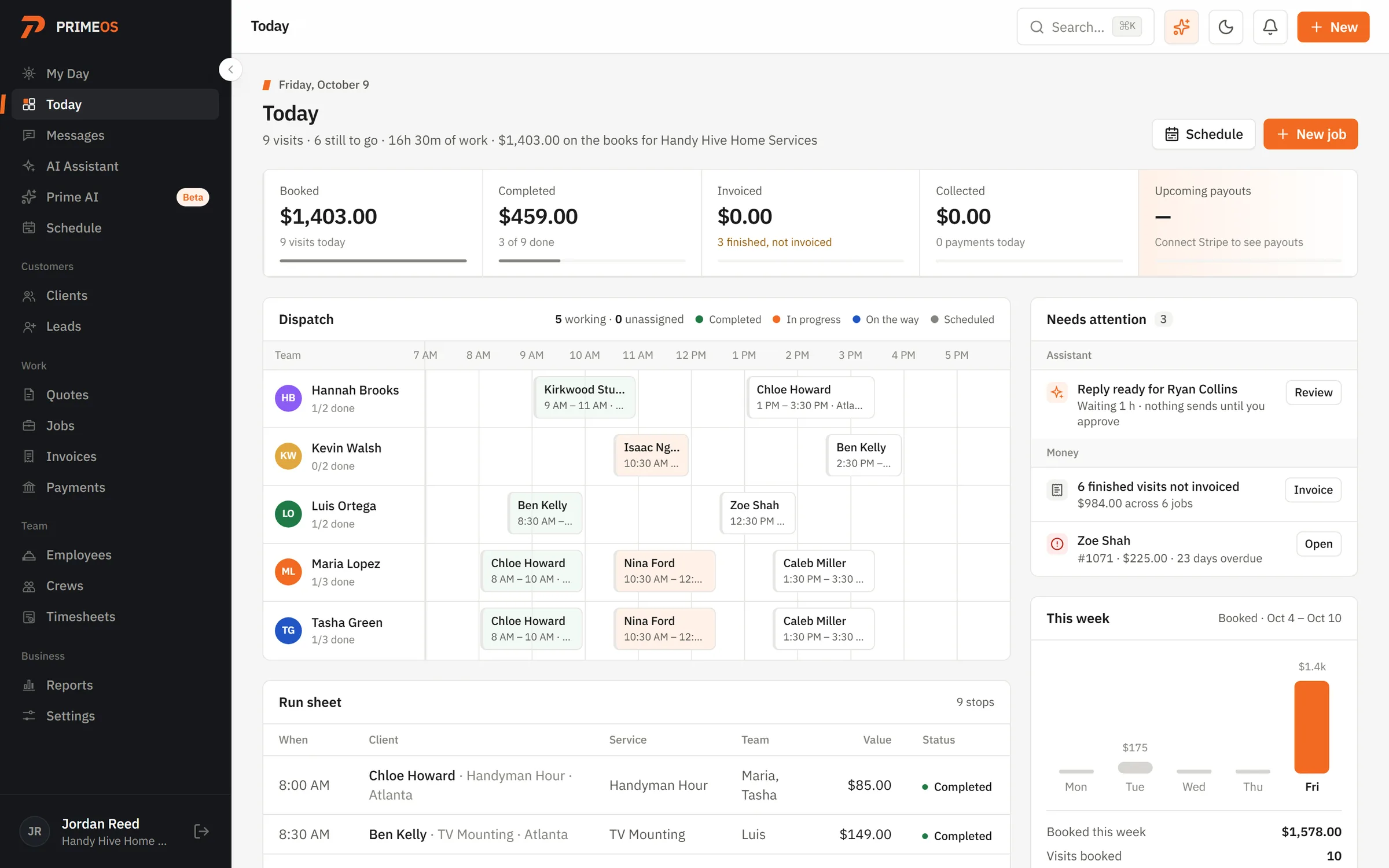
TodayHandy Hive Home Services's day: dispatch, money and what needs attention
app.getprimeos.io/schedule
ScheduleEvery crew and every visit
app.getprimeos.io/messages
MessagesA real lead, with the AI's draft reply
app.getprimeos.io/invoices
InvoicesBranded, paid online
On their phonesTech's My Day, the client's quote, the client portal
Prime AI · beta
Ask your business. Approve what gets done.
Who hasn't booked in 60 days? Which quotes went quiet? Who owes you? Prime AI answers from your records and prepares the follow-ups. Nothing sends until you approve it.